Showing posts with label tech. Show all posts

Wednesday, May 15, 2013

My Measures... non-quilting app that I use to record quilts

My Measures Pro review

I have a memory like a steel trap... assuming the trap has been left outside for a decade or two and has rusted into a dusty pile of mush. Because of this, I have to keep good records somewhere. With mountains of notebooks, sketch pads, and binders full of graph paper, I never know where I jotted down the dimensions for anything.

For my writing, I have all kinds of apps that keep my notes categorized so I only have to revisit Notebook Hill when I want to revisit an old random idea. I decided that I needed an app that would keep specific records of the sizes of blocks, appliques, borders, etc and when My Measures Pro came through on one of the "free app of the day" lists, I tried it.

It's meant for designers to take a picture of a room and record the measurements of windows, walls, angles, etc... but I don't do any of that. I use it to record quilts.


It's very simple to use. With the above quilt, I know everything I need to know to be able to duplicate it - which I have to do this weekend, with an added border to make it bigger. I hate making the same quilt twice, but for the occasions that I have to, this comes in handy. 

Not that I've done any crazy angles lately, but if I wanted to, I could just take a picture of the block and use the angle measure to remind me what they were. This could possibly come in handy if I stop in the middle of a quilt and set it aside for a while... actually, that should be "when," not "if." I do that all the time. I put an example of the angle feature below and if they had actually turned out to be an exact 45 and 90 degrees, I might have had a heart attack.


Anyway, I think it costs $1.99 and is available for IOS and Android. I enjoy having it and think it comes in handy.

Ricky

Wednesday, February 27, 2013

Excel and Applique

 I love doing things the easy way and if you have a large image that needs to be printed so you can applique it, this is the easiest.

At home, I have PhotoShop and other heavy duty photo manipulating programs that can do everything from enlarging a picture to buying me candy on Valentine's Day... and sometimes that's just a little much. At work, I don't have all of those and that turned out to be a good thing because I found the simplest way to print appliques ever.

My office computer has Windows and runs Excel 2007. At home I have Macs that run Excel 2011 and the principles are all generally the same. In about two minutes, I can resize and print out any image I purchase and want to applique.

On the Excel tabs, click insert, then picture, and find the file you want to use.

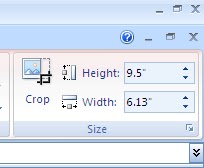
Once it's inserted, look at the box on the top right and tell it the size you want. Some programs ask about pixel size and I never, ever know the right number of pixels without opening Photoshop, creating something with the right measurements, using the ruler to calculate pixels, etc.; and since that's not the easy way, I like that Excel will let you deal solely with inches.

Excel will also keep the image proportional. I know that I want to use this image on a 10" block, so I set the largest number at 9.5" and Excel does the rest.


But, the best part is that if you have an image that will not fit on one page, Excel will automatically print the picture as a poster and you will just need to tape the sheets together. No other manipulation needed. I have printed out images up to 40"X 40" - and this is the simplest program I've used and it's on just about every computer around. Just one word of preemptive caution if you are printing out something that large, you may want to go to the "page setup" menu and tell it to number the pages as they are printed so you can keep them straight.


Oh, and as always when you are tracing a picture with fusible webbing, the applique will be facing the opposite direction than the picture you started out with, so keep that in mind.

Hopefully someone will get some use out of this :-)

Thanks, and happy quilting.